VanchromeClear-Regular
OpenTypeフリーウェアアップデート完了
- アクセント (部分)
- アクセント (フル)
- ユーロ
Vanchrome Clear.otf
タグ
著者の注記
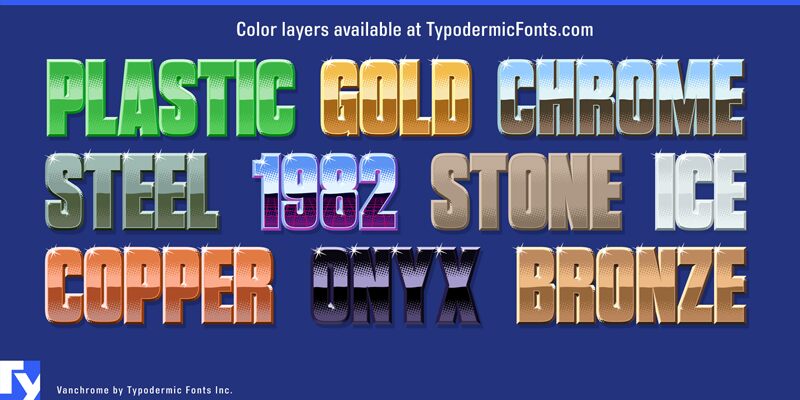
Vanchrome is a compact sans-serif headliner with chromatic layers. Create a layer in your design application, copy the layer, change the style, change the colors. Some applications such as Photoshop might need manual vertical alignment so cross-hair in the ◊ character position has been included. Due to the way Vanchromes bevel shading is designed, the Left and Right bevels should be placed under the Up and Down bevels. For a classic chrome effect, try the following order: Back, Front, Horizon, Ground, Sky, Left, Right, Up, Down, Grid (optional), Edge, Sparkle. Manually offset the back style to make a drop shadow. The Clear layer is designed to be used on its own or layered between Back and Sparkle layers. Greek and Cyrillic alphabets are included.
If you'd like separate color layers, you can get them at Typodermic Fonts.
The desktop license for Vanchrome Clear is free. If you'd like to embed this font in an app, ebook, on the web or anything that's not covered by the desktop license agreement, visit the link below. You'll find distributors who offer different types of licenses or you can contact me for help.
Please read the FAQ on the front page of Typodermic Fonts and don't be afraid to ask questions if you're not sure.
http://typodermicfonts.com/vanchrome
If you'd like separate color layers, you can get them at Typodermic Fonts.
The desktop license for Vanchrome Clear is free. If you'd like to embed this font in an app, ebook, on the web or anything that's not covered by the desktop license agreement, visit the link below. You'll find distributors who offer different types of licenses or you can contact me for help.
Please read the FAQ on the front page of Typodermic Fonts and don't be afraid to ask questions if you're not sure.
http://typodermicfonts.com/vanchrome
文字マップ
このフォントに含まれる異なる文字マップを閲覧するには、プルダウンメニューを利用してください。

フォントの基本情報
著作権告示
Released in 2024 under CC0 license. No rights reserved.
フォントファミリー
Vanchrome Clear
フォントサブファミリー
Regular
ユニークサブファミリーID
Version 1.001;TYPO;VanchromeClear-Regular;2024;FL830
フルフォント名
VanchromeClear-Regular
名称表バージョン
Version 1.001
ポストスクリプトフォント名
VanchromeClear-Regular
製造元
Ray Larabie
デザイナー
説明
Introducing Vanchrome—the chromed up typeface with a compact sans-serif design and chromatic layer system, you’ll be able to create designs that truly stand out.
Let’s start with the layer system. Vanchrome’s layer system is designed for maximum flexibility. All you have to do is create a layer in your design application, copy the layer, change the style, and change the colors. It’s that easy! And if you’re using Photoshop, we’ve even included a crosshair in the ◊ character position to ensure perfect vertical alignment.
Now, let’s talk about Vanchrome’s layering. The left and right bevels should be placed under the up and down bevels to achieve the classic chrome effect. For that classic look, try the following layer order: Back, Front, Horizon, Ground, Sky, Left, Right, Up, Down, Grid (optional), Edge, and Sparkle. And why not duplicate and manually offset the back style to create a drop shadow effect?
So why settle for ordinary when you can create designs that are truly unique with Vanchrome? Whether you’re designing logos, posters, or anything in between, Vanchrome’s chromatic layers and airbrushed chrome effect will take your designs to the next level. Try it out today and see the difference for yourself!
Let’s start with the layer system. Vanchrome’s layer system is designed for maximum flexibility. All you have to do is create a layer in your design application, copy the layer, change the style, and change the colors. It’s that easy! And if you’re using Photoshop, we’ve even included a crosshair in the ◊ character position to ensure perfect vertical alignment.
Now, let’s talk about Vanchrome’s layering. The left and right bevels should be placed under the up and down bevels to achieve the classic chrome effect. For that classic look, try the following layer order: Back, Front, Horizon, Ground, Sky, Left, Right, Up, Down, Grid (optional), Edge, and Sparkle. And why not duplicate and manually offset the back style to create a drop shadow effect?
So why settle for ordinary when you can create designs that are truly unique with Vanchrome? Whether you’re designing logos, posters, or anything in between, Vanchrome’s chromatic layers and airbrushed chrome effect will take your designs to the next level. Try it out today and see the difference for yourself!
フォントの拡張情報
サポートされているプラットフォーム
プラットフォーム暗号化中
ユニコードユニコード2.0 とオンワード・セマンティクス、ユニコードBMPのみ
マッキントッシュラテン語
マイクロソフトユニコード BMPのみ
フォントの詳細
作成完了2024-04-04
修正1
グリフカウント505
Emごとのユニット1000
埋め込み権利永続的インストール目的の埋め込み
ファミリークラス無
重さ太字(ボールド)
幅コンデンス(横幅狭)化
Mac仕様ボールド体
方向強い左右方向のグリフ、中立も含む
パターンの性質定期的に
ピッチモノスペースでない
完全版は、以下のリストに示された14フォントの重さを含んでいます。
Vanchrome Clear.otf
Vanchrome Grid.otf
Vanchrome Front.otf
vanchrome back.otf
Vanchrome Sparkle.otf
Vanchrome Left.otf
Vanchrome Up.otf
Vanchrome Right.otf
Vanchrome Edge.otf
Vanchrome Horizon.otf
Vanchrome Down.otf
Vanchrome Sky.otf
Vanchrome Ground.otf
Vanchrome Outline.otf
Vanchrome Grid.otf
Vanchrome Front.otf
vanchrome back.otf
Vanchrome Sparkle.otf
Vanchrome Left.otf
Vanchrome Up.otf
Vanchrome Right.otf
Vanchrome Edge.otf
Vanchrome Horizon.otf
Vanchrome Down.otf
Vanchrome Sky.otf
Vanchrome Ground.otf
Vanchrome Outline.otf
VanchromeGrid-Regular
OpenTypeフリーウェアアップデート完了
VanchromeFront-Regular
OpenTypeフリーウェアアップデート完了
VanchromeBack-Regular
OpenTypeフリーウェア
VanchromeSparkle-Regular
OpenTypeフリーウェアアップデート完了
VanchromeLeft-Regular
OpenTypeフリーウェアアップデート完了
VanchromeUp-Regular
OpenTypeフリーウェアアップデート完了
VanchromeRight-Regular
OpenTypeフリーウェアアップデート完了
VanchromeEdge-Regular
OpenTypeフリーウェアアップデート完了
VanchromeHorizon-Regular
OpenTypeフリーウェアアップデート完了
VanchromeDown-Regular
OpenTypeフリーウェアアップデート完了
VanchromeSky-Regular
OpenTypeフリーウェアアップデート完了
VanchromeGround-Regular
OpenTypeフリーウェアアップデート完了
VanchromeOutline-Regular
OpenTypeフリーウェアアップデート完了